AI automation
Describe the automation. The Copilot builds it.
Turn repetitive work into workflows that run on their own: follow up leads, confirm orders, send reminders and keep your sheets up to date. Type or say what you need, or drag and drop it yourself.
01 Copilot demo
One sentence in. A working workflow out.
Pick an industry to see what the Copilot builds from a plain request, in Arabic or English.
When someone asks about a property on WhatsApp, check their budget and area, then book a viewing in Google Calendar.
Built a 4-step workflow. Review it and switch it on.
When a new order comes from our website, send the customer a WhatsApp confirmation with the delivery time and log it.
Built a 4-step workflow. Review it and switch it on.
Every morning at 9, remind tomorrow’s patients on WhatsApp and mark who confirms in our sheet.
Built a 4-step workflow. Review it and switch it on.
When a cart is abandoned in our store, send a friendly WhatsApp nudge with what they left behind.
Built a 3-step workflow. Review it and switch it on.
When a customer asks where their order is, look it up in our system and reply with the status.
Built a 4-step workflow. Review it and switch it on.
When a student signs up, follow up on WhatsApp and email admissions a short summary.
Built a 4-step workflow. Review it and switch it on.
03 Node library
25 building blocks, five families.
Everything the Copilot uses is also yours to drag onto the canvas. Need another app? The HTTP request reaches any system with an API.
- Manual
- Schedule
- Webhook
- WhatsApp message
- Messenger message
- Telegram message
- Gmail
- Messenger
- Telegram
- Google Calendar
- Google Docs
- Google Drive
- Google Sheets
- HTTP request
- AI agent
- Summarise
- Draft reply
- Classify
- Lead qualification
- Translate
- Sentiment & priority
- Branch on conditions
- Loop over items
- Shape data
04 Anatomy of a run
What happens every time it runs.
- 01Trigger
A message arrives, a schedule fires or your store sends a webhook.
- 02Fetch
The workflow reads what it needs from Sheets, Calendar or your API.
- 03Decide
AI steps classify, qualify, summarise or draft a reply.
- 04Branch
Conditions send each case down the right path.
- 05Act
Messages go out and records are written back.
- 06Log
Each step’s result is visible in test runs.
05 · Visual builder
Prefer to build it yourself? Drag, drop, done.
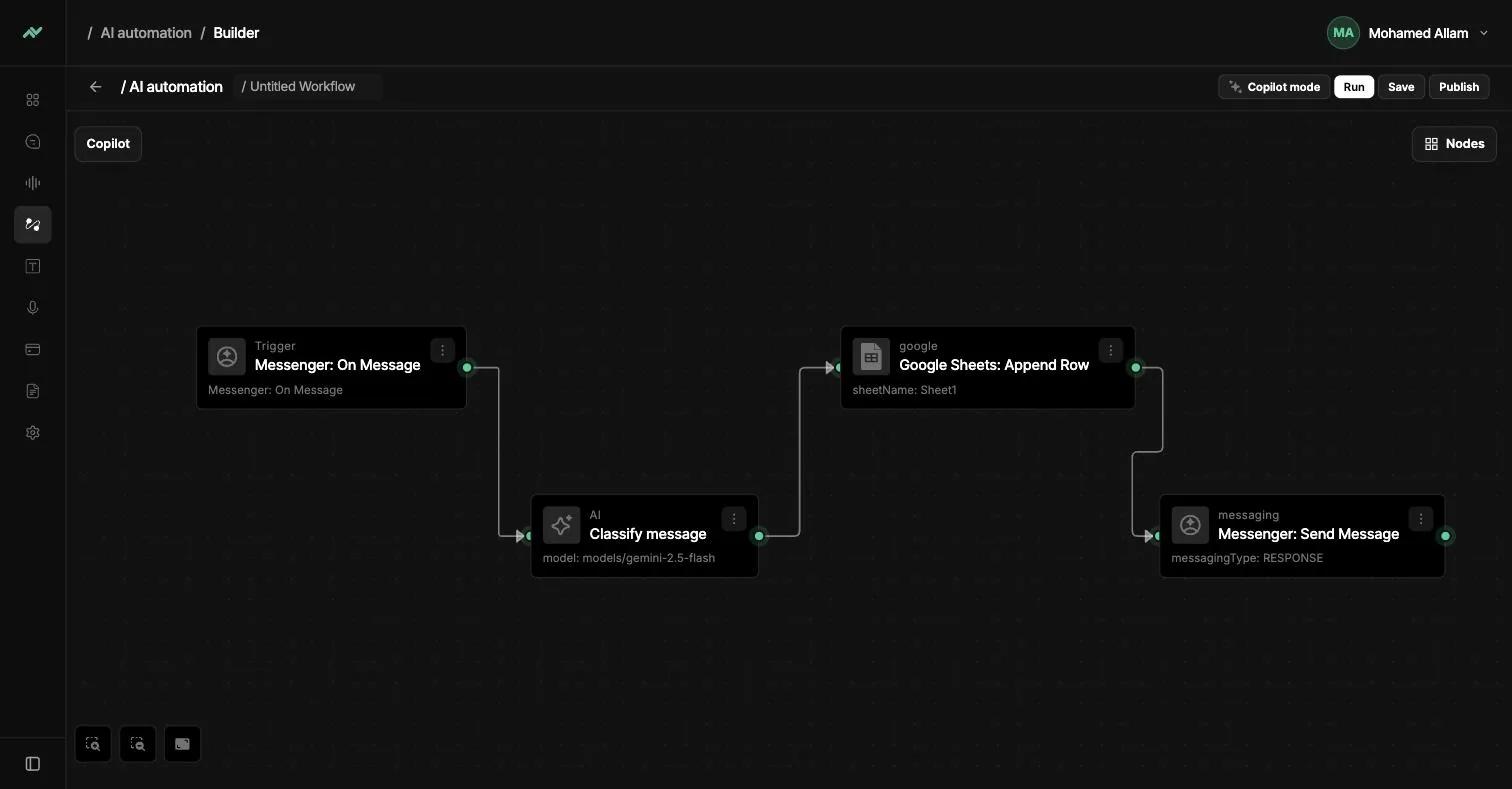
Every workflow lives on a visual canvas. Add nodes, connect them and test each step before it goes live.
- Test runs step by step
- Drafts saved automatically
- Start from the Copilot, finish by hand
06 · Copilot
Talk to it like a colleague.
Write or speak your request in Arabic or English. The Copilot picks the trigger, adds the AI steps and connects the apps. You review it and switch it on.
- Text or voice input
- Arabic and English
- Everything stays editable
When a new lead messages us on WhatsApp, qualify them, save them to Google Sheets and reply.
Done. I built a 4-step workflow. Review it and switch it on.
- 1TriggerNew WhatsApp message
- 2AIQualify the lead
- 3Google SheetsAdd a row
- 4WhatsAppSend a reply
07 Works with
Built-in apps, and any API.
- WhatsAppBuilt in
- MessengerBuilt in
- TelegramBuilt in
- GmailBuilt in
- Google SheetsBuilt in
- Google CalendarBuilt in
- Google DocsBuilt in
- Google DriveBuilt in
- WebhooksBuilt in
- HTTP requestBuilt in
- ShopifyVia API
- HubSpotVia API
Automate your first workflow in a minute.
Describe it to the Copilot on the free plan.